Bluetooth Profiles and 32feet.NET
14th July 2010
Copyright © 2008-2010 Alan J. McFarlane
Bluetooth Profiles and 32feet.NET
Profiles based on other protocols
File and object transfer, and sync etc
Introduction
The Bluetooth system has a protocol stack similar to the following.
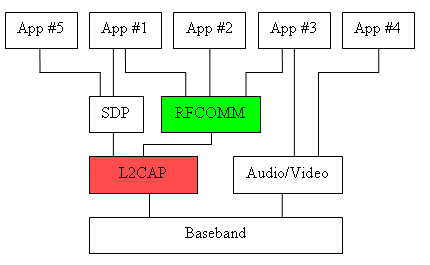
RFCOMM is the protocol used by application level services. Therefore it is the protocol that Windows exposes through Winsock, and thus it's the one that the 32feet.NET library exposes too. The SCO and L2CAP protocol are not exposed through Winsock but instead only through driver level interfaces. Therefore 32feet.NET is not able to expose these protocols.
Below I list many of the standard Bluetooth Profiles and whether they use RFCOMM, and thus whether the 32feet.NET library can be used to connect and send and receive data to/from them.
Even if a connection can’t be make to the service itself, the library can be used for other Bluetooth tasks, for instance discovery, pairing, searching SDP records, and enabling and disabling the operating system from using particular services on the device, for instance: BluetoothDeviceInfo.SetServiceState( BluetoothService.HumanInterfaceDevice, true).
Protocols
OBEX-based profiles
Many of the profiles are based on OBEX, with the OBEX protocol usage being defined a document entitled General Object Exchange Protocol (GOEP). The standard profiles using this protocol are OPP, FTP, SYNC, BPP, and BIP, PBAP, and MAP.
32feet.NET has the ObexWebRequest and ObexListener class for client and server side use respectively. Both support PUT and the default OBEX service, however there is some support for GET in the latest ObexWebRequest and both could be reconfigured to use different OBEX services e.g. BIP.
Brecham.Obex is a separate library also available from the 32feet.net website. It provides very complete OBEX support: PUT, GET, SETPATH, and Folder Listings. It can be called in an asynchronous manner to allow progress monitoring etc. There is also an open-source library using it to provide server functionality. Both can be configured to use any OBEX service.
RFCOMM-based profiles
SPP, FAX, DUN, LANP, and SAP.
(Of course the GOEP protocols use RFCOMM).
Profiles based on other protocols
Using L2CAP: HCRP, PAN, HID, HDP (Health Device), and AVRCP. The PAN profiles use the BNEP (Bluetooth Network Encapsulation Protocol) layer over L2CAP.
Using Audio/Video: HSP, HFP, A2DP, AVRDP, etc etc.
Windows support for Profiles
Windows 7 includes in-box support for: A2DP, Handsfree, Headset, and AVRCP, as well as those that were supported by previous versions: HID, Serial Port, OPP, PAN, DUN, and HCRP.
Profiles
File and object transfer, and sync etc
OPP
As I wrote in an earlier document on IrDA [1]:
Sending address book entries, business cards, calendar entries etc. It is very widely supported on Mobile Phones, PDAs and PCs. It is PalmOS’s Beaming, Nokia’s “Send … via IR“, Windows 2000’s Wireless Link File Transfer (irftp.exe), Linux’s OpenObex etc.
It is used similarly in Bluetooth; it is Windows’ “Bluetooth File Transfer Wizard”, and similar names as before in the other platforms.
An advanced form of OPP that supports fetching and browsing is FTP, see below.
It is also a very convenient means for printers to accept jobs; the peer device does not need to support any printer control language e.g. PCL or PostScript etc, but can print common OBEX object types simply by beaming them to the printer, through OPP, BPP or BIP etc.
|
Name: |
OPP |
|
|
Object Push Profile |
|
Profile ID: |
0x1105 ObexObjectPush |
|
Protocol: |
GOEP |
|
Class Id: |
0x1105 ObexObjectPush |
|
OBEX Target ID: |
— |
Supported in 32feet.NET by ObexWebRequest and ObexListener.
Supported in Brecham.Obex, and in its server component.
[1] http://www.alanjmcf.me.uk/comms/infrared/IrDA%20uses%20(brief).html
FTP
An advanced form of OPP that supports fetching (‘GET) as well as the usual sending (‘PUT’) mode, arbitrary object/file types, and even browsing the peer’s file system (folder listings and set-path).
|
Name: |
FTP |
|
|
File Transfer Profile |
|
Profile ID: |
0x1106 ObexFileTransfer |
|
Protocol: |
GOEP |
|
Class Id: |
0x1106 ObexFileTransfer |
|
OBEX Target ID: |
F9EC7BC4-953C-11D2-984E-525400DC9E09, from IrDA spec. |
Partial support in 32feet.NET by ObexWebRequest, GET is partially supported.
Supported in Brecham.Obex, and in its server component.
SYNC
IrMC
|
Name: |
SYNC |
|
|
Synchronization Profile |
|
Profile ID: |
0x1104 IrMCSync |
|
Protocol: |
GOEP |
|
Class Id: |
0x1104 IrMCSync; |
|
OBEX Target ID: |
“IRMC-SYNC”, from IrDA spec. |
BIP
From the specification:
The File Transfer Profile defines a mechanism enabling Bluetooth devices to exchange files in a generic fashion. The foundation of the Basic Imaging Profile is a series of constructs that enable Bluetooth devices to negotiate the size and encoding of imaging data to be exchanged. […] Built on this negotiation mechanism and required imaging format are six features, ranging from very basic image transfer to remote control operations, that enable the usage scenarios described in the Bluetooth Imaging Market Requirements Document.
|
Name: |
BIP |
|
|
Basic Imaging Profile |
|
Profile ID: |
0x111A Imaging |
|
Protocol: |
GOEP |
|
Class Id: |
0x111B ImagingResponder; |
|
OBEX Target ID: |
various |
GOEP connection supported in Brecham.Obex, and in its server component.
PBAP
From the specification:
The Phone Book Access Profile (PBAP) specification defines the procedures and protocols to exchange Phone Book objects between devices. It is especially tailored for the automotive Hands-Free use case where an onboard terminal device (typically a Car-Kit installed in the car) retrieves Phone Book objects from a Mobile device (typically a mobile phone or an embedded phone). This profile can however also be used for other use cases that require the exchange of Phone Book objects between two devices.
|
Name: |
PBAP |
|
|
Phone Book Access Profile |
|
Profile ID: |
0x1130 Phonebook Access |
|
Protocol: |
GOEP |
|
Class Id: |
0x112E Phonebook Access Client |
|
OBEX Target ID: |
796135f0-f0c5-11d8-0966-0800200c9a66 |
GOEP connection supported in Brecham.Obex, and in its server component.
SAP
From the specification:
This SIM Access Profile defines the protocols and procedures that shall be used to access a GSM SIM card, a UICC card or a R-UIM card via a Bluetooth link. … For example, with this profile, the user can personalize his/her car-embedded phone with a subscription module in an external device, which is connected via a Bluetooth wireless link. The external device can either be a simple SIM card holder or a portable phone, which is brought into the car.
|
Name: |
SAP |
|
|
SIM Access Profile |
|
Profile ID: |
0x112D SIM Access |
|
Protocol: |
RFCOMM |
|
Class Id: |
0x112D SIM Access |
Supported by 32feet.NET using BluetoothClient etc.
MAP
From the specification:
The Message Access Profile (MAP) specification defines a set of features and procedures to exchange messages between devices. It is especially tailored for the automotive handsfree use case where an onboard terminal device (typically a Car-Kit installed in the car) takes advantage of the messaging capability of a communication device (typically a mobile phone). This profile can however also be used for other use cases that require the exchange of messages between two devices.
This MAP version of supports the message types GSM-SMS, CDMA-SMS, Email and MMS. Future versions may support additionally other message types, for instance cell-broadcast messages and may add further functionality.
|
Name: |
MAP |
|
|
Message Access Profile |
|
Profile ID: |
0x1134 Message Access Profile |
|
Protocol: |
GOEP |
|
Class Id: |
0x1132 Message Access Server -and- 0x1133 Message Notification Server |
GOEP connection supported in Brecham.Obex, and in its server component.
Printing
HCRP and BIP. Also SPP and OPP.
HCRP
From the specification:
The usage model includes, but is not limited to, printing and scanning any type of document. The data is rendered through the use of a driver on the client device. … The most common devices using these usage models are mobile laptops and desktop computers, although other devices are not excluded.
This profile does not include the printing of pure images such as those created by cameras and similar devices; this application is covered by the Still Image Profile [BIP?]. Driverless printing for mobile devices such as mobile phones, pagers, and PDAs is defined in the Basic Printing Profile.
There are other existing Bluetooth profiles which could possibly be used for printing and scanning: the SPP, GOEP, OPP, FTP, and PAN, as well as potentially others.
|
Name: |
HCRP |
|
|
Hardcopy Cable Replacement Profile |
|
Profile ID: |
0x1125 HardcopyCableReplacement |
|
Protocol: |
L2CAP |
|
Class Id: |
0x1126 HardcopyCableReplacementPrint; 0x1127 HardcopyCableReplacementScan |
Not supported nor supportable by 32feet.NET.
BPP
From the specification:
The Basic Printing Profile defines the requirements for the protocols and procedures that shall be used by applications providing the Basic Printing usage model. This Profile makes use of the Generic Object Exchange Profile (GOEP) to define the interoperability requirements for the protocols needed by applications. The most common devices using these usage models are mobile devices such as mobile phones, pagers, and PDAs, although more complex devices are not excluded. Usage models include printing of text emails, short messages, and formatted documents. Optional support for the printing of structured data objects such as vCard and vCalendar is also defined, as well as methods for negotiating the use of other formats supported by the printer.
Printing from sending devices such as laptops and desktop PCs, where printer-specific drivers may be loaded, is defined in the Hardcopy Cable Replacement Profile.
|
Name: |
BPP |
|
|
Basic Printing Profile |
|
Profile ID: |
0x1122 BasicPrinting |
|
Protocol: |
GOEP |
|
Class Id: |
0x1119 ReferencePrinting, 0x1123 PrintingStatus, 0x1118
DirectPrinting; 0x1121 ReflectedUI; |
|
OBEX Target ID: |
Various |
GOEP connection supported in Brecham.Obex, and in its server component.
Networking
The Bluetooth SIG has defined various networking profiles over time, DUN and LANP earlier, and PAN more recently (LANP seems largely disowned by the SIG — there's apparently no spec available). This variety of specifications has of course made life more difficult for users since different devices support different profiles.
Some of these profiles use RFCOMM, and the 32feet.NET library can make a Bluetooth connection to such services. However that's not useful. Your application would then be the one needing to send and receive TCP/IP (etc) packets!
What's needed instead is that the operating-system itself connects and integrates the new network link into its network routing infrastructure (and thus appears in ipconfig etc). For instance, if a networking device was attached by serial cable one would use Window’s RAS/RRAS/DUN features to make the connection and not HyperTerminal.
PAN — NAP, GN, PANU
From the specification:
The Personal Area Networking (PAN) Profile describe how two or more Bluetooth enabled devices can form an ad-hoc network and how the same mechanism can be used to access a remote network through a network access point. The profile roles contained in this document are the Network Access Point, Group Ad-hoc Network, and Personal Area Network User. Network access points can be a traditional LAN data access point while Group Ad-hoc Networks represent a set of devices that are only attached to one another.
A protocol called BNEP (Bluetooth Network Encapsulation Protocol) is used to transport the network packets over L2CAP.
|
Name: |
PAN |
|
|
Personal Area Networking Profile |
|
Profile ID: |
0x1116 NAP; 0x1117 GN; 0x1115 PANU |
|
Protocol: |
L2CAP |
|
Class Id: |
0x1116 NAP; 0x1117 GN; 0x1115 PANU |
Not supported nor supportable by 32feet.NET.
DUN
From the specification:
The scenarios covered by this profile are the following:
· Usage of a cellular phone or modem by a computer as a wireless modem for connecting to a dial-up internet access server, or using other dial-up services
· Usage of a cellular phone or modem by a computer to receive data calls
|
Name: |
DUN |
|
|
Dial-Up Networking Profile |
|
Profile ID: |
0x1103 DialupNetworking |
|
Protocol: |
RFCOMM and SCO if audio monitoring enabled |
|
Class Id: |
0x1103 DialupNetworking, (0x1201 GenericNetworking) |
A connection could be made, and the dial-up process carried out, however once a dial-up connection is made PPP packets are then transferred and the application would itself have to send and receive TCP/IP packets etc.
LANP
From the specification:
— missing —
|
Name: |
LAP, LANP, or LAN? |
|
|
|
|
Profile ID: |
0x1102 LanAccessUsingPpp |
|
Protocol: |
RFCOMM |
|
Class Id: |
0x1102 LanAccessUsingPpp |
Audio/Visual
An audio/video stream is always carried in a SCO connection over the baseband layer in the standard profiles, and not in a RFCOMM connection. It thus can't be accessed with 32feet.NET.
In some (many?) cases there's also a control channel which is often an RFCOMM connection, for instance Headset and Hands Free have this. 32feet.NET could be used to access such control channels.
If you’re creating a college project or similar where you are writing the software for both ends of the connection, then just send the audio over an RFCOMM connection. You’ll get worse latency jitter but it will likely work well enough…
Headset
From the specification:
This Headset profile defines the protocols and procedures that shall be used by devices implementing the usage model called ‘Ultimate Headset’. The most common examples of such devices are headsets, personal computers, and cellular phones.
The headset can be wirelessly connected for the purposes of acting as the device’s audio input and output mechanism, providing full duplex audio. The headset increases the user’s mobility while maintaining call privacy
The two roles are Headset (HS) and Audio Gateway (AG).
|
Name: |
HSP |
|
|
Headset Profile |
|
Profile ID: |
0x1108 Headset |
|
Protocol: |
SCO and RFCOMM |
|
Class Id: |
0x1108 Headset; (0x1203 GenericAudio) |
The Audio channel is not supported nor supportable by 32feet.NET. A connection could be made to the Control channel.
Use BluetoothDeviceInfo.SetServiceState to tell Windows to use the service.
Hands Free
From the specification:
An implementation of the Hands-Free Profile typically enables a headset, or an embedded Hands-Free unit to connect, wirelessly, to a cellular phone for the purposes of acting as the cellular phone’s audio input and output mechanism and allowing typical telephony functions to be performed without access to the actual phone.
It is different to the Headset profile in that “the typical telephony functions can be performed without access to the actual phone”.
The two roles are Hands-Free unit (HF) and Audio Gateway (AG).
|
Name: |
HFP |
|
|
Hands-Free Profile |
|
Profile ID: |
0x111E Hands-Free |
|
Protocol: |
SCO and RFCOMM |
|
Class Id: |
0x111E Handsfree; (0x1203 GenericAudio) |
The Audio channel is not supported nor supportable by 32feet.NET. A connection could be made to the Control channel.
Use BluetoothDeviceInfo.SetServiceState to tell Windows to use the service.
“Windows CE Networking Team WebLog : Extending the Bluetooth Hands Free Profile” http://blogs.msdn.com/cenet/archive/2005/08/12/451012.aspx
ICP
From the specification:
This Intercom profile defines the protocols and procedures that shall be used by devices implementing the intercom part of the usage model called ‘3-in-1 phone’. More popularly, this is often referred to as the ‘walkie-talkie’ usage of Bluetooth.
|
Name: |
ICP |
|
|
Intercom Profile |
|
Profile ID: |
0x1110 Intercom |
|
Protocol: |
SCO and L2CAP |
|
Class Id: |
0x1110 Intercom, 0x1204 Generic Telephony |
Not supported nor supportable by 32feet.NET.
CTP
From the specification:
The Cordless Telephony profile defines the protocols and procedures that shall be used by devices implementing the use case called ‘3-in-1 phone’.
The ‘3-in-1 phone’ is a solution for providing an extra mode of operation to cellular phones, using Bluetooth as a short-range bearer for accessing fixed network telephony services via a base station. However, the 3-in-1 phone use case can also be applied generally for wireless telephony in a residential or small office environment …
|
Name: |
CTP |
|
|
Cordless Telephony Profile |
|
Profile ID: |
0x1109 Cordless Telephony |
|
Protocol: |
SCO and L2CAP |
|
Class Id: |
0x1109 Cordless Telephony, 0x1204 Generic Telephony |
Not supported nor supportable by 32feet.NET.
A2DP
From the specification:
The Advanced Audio Distribution Profile (A2DP) defines the protocols and procedures that realize distribution of audio content of high-quality in mono or stereo on ACL channels. The term “advanced audio”, therefore, should be distinguished from “Bluetooth audio”, which indicates distribution of narrow band voice on SCO channels as defined in Chapter 12 of Bluetooth Baseband specification [2].
The two roles are Source and Sink.
|
Name: |
A2DP |
|
|
Advanced Audio Distribution Profile |
|
Profile ID: |
0x110D Advanced Audio Distribution |
|
Protocol: |
SCO and L2CAP |
|
Class Id: |
0x110A Audio Source -and- 0x110B Audio Sink |
Not supported nor supportable by 32feet.NET.
Use BluetoothDeviceInfo.SetServiceState to tell Windows to use the service.
VDP
From the specification:
The Video Distribution Profile (VDP) defines the protocols and procedures that realize distribution of video content, using ACL channels. A typical usage case is streaming of video content from an observation camera to a monitor. The Video data is compressed in a specific format for efficient use of the limited bandwidth.
|
Name: |
VDP |
|
|
Video Distribution Profile |
|
Profile ID: |
0x1305 Video Distribution |
|
Protocol: |
SCO and L2CAP |
|
Class Id: |
0x1103 Video Source -and- 0x1104 Video Sink |
Not supported nor supportable by 32feet.NET.
Other profiles
HID
From the specification:
The Human Interface Device Profile Specification defines the protocols, procedures, and features that shall be used by Bluetooth Human Interface Devices, such as keyboards, pointing devices, gaming devices, and remote monitoring devices. This specification uses the USB (Universal Serial Bus) definition of Human Interface Device (HID) in order to leverage the existing class drivers for USB HID devices.
The two roles are Device and Host.
|
Name: |
HID |
|
|
Human Interface Device |
|
Profile ID: |
0x1124 HumanInterfaceDevice |
|
Protocol: |
L2CAP |
|
Class Id: |
0x1124 HumanInterfaceDevice |
The native Bluetooth stack should be configured to use the HID service on the device, this can be done programmatically on Win32 by using BluetoothDeviceInfo.SetServiceState. That will (hopefully) make the HID streams accessible through Window’s HID service and APIs.
For information and code for using the Wiimote from .NET see Brian Peek’s article “Managed Library for Nintendo's Wiimote” at http://blogs.msdn.com/coding4fun/archive/2007/03/14/1879033.aspx. As noted above there is no Bluetooth code, only HID code. Similar solutions could presumably be used for other HID device.
AVRCP
From the specification:
The functions available for a conventional infrared remote controller can be realized in this profile. In addition to this the profile uses Bluetooth specific extensions to support transfer of metadata related to content to be transferred between Bluetooth devices. Browsing features are provided to allow a remote controller to navigate the media and control specific media players on the remote target device. The remote control described in this profile is designed specific to A/V control. Other remote control solutions using Bluetooth wireless technology may be applied for general Bluetooth devices including A/V devices.
Note that the Audio/Video Remote Control Profile does not handle the audio/video streaming. Devices that support this profile may support audio/video streaming by also implementing the Advanced Audio Distribution Profile and/or Video Distribution Profile.
The two roles are Controller (CT) and Target (TG).
(Note that there are two similarly named ‘transport protocols’:
- AVCTP “Audio/Video Control Transport Protocol” used by this profile, and
· AVDTP “Audio/Video Distribution Transport Protocol” used by A2DP).
|
Name: |
AVRCP |
|
|
Audio/Video Remote Control Profile |
|
Profile ID: |
0x110E A/V Remote Control |
|
Protocol: |
L2CAP |
|
Class Id: |
0x110E A/V Remote Control 0x110F A/V Remote Control Controller -and- 0x110C A/V Remote Control Target |
Not supported nor supportable by 32feet.NET.
Use BluetoothDeviceInfo.SetServiceState to tell Windows to use the service.
HDP
From the specification:
The Health Device Profile (HDP) is an application profile that defines the requirements for qualified Bluetooth Healthcare and Fitness (referred to as ‘health’) device implementations. This profile is used for connecting application data Source devices such as blood pressure monitors, weight scales, glucose meters, thermometers, and pulse oximeters to application data Sink devices such as mobile phones, laptops, desktop computers, and health appliances without the need for cables. This profile makes use of the Multi-Channel Adaptation Protocol (MCAP) [2] and new L2CAP features such as Enhanced Retransmission Mode, Streaming Mode and optional FCS [1] to define the interoperability requirements.
The two roles are Source and Sink.
|
Name: |
HDP |
|
|
Health Device Profile |
|
Profile ID: |
0x1400 HDP |
|
Protocol: |
L2CAP |
|
Class Id: |
0x1401 HDP Source |
Not supported by 32feet.NET.
Change Log
|
14th July 2010 |
Added remaining profiles. |
|
2nd February 2009 |
Added reference to Wiimote article at Coding4Fun. |
|
DRAFT |
Added words on ObexWebRequest/-Listener/Brecham.Obex to GOEP section, added list of profiles using other protocols e.g. HCRP for L2CAP etc. |
|
DRAFT |
First version |
Copyright © 2008-2010 Alan J. McFarlane